How to Take Fireworks Photos with Your Phone: 3 Key Fixes
Most phone fireworks photos fail for the same three reasons: the phone brightens a dark sky until every burst blows out to white, autofocus hunts between shells and locks onto nothing, and tapping the shutter shakes the phone at the worst possible moment. Fix those three things, and the camera handles the rest. This guide walks through each fix, then covers framing, timing, and the built-in modes worth using on iPhone, Pixel, and Samsung.
As Google Pixel Senior Product Manager Michael Specht put it to PetaPixel last year: "Ultimately [your smartphone] is a camera." The fundamentals transfer. The phone is capable. The only question is whether it's set up correctly.
Five minutes before the show? Do these three things:
- Prop the phone against something solid
- Press and hold the sky to lock focus and exposure, then drag exposure down
- Turn flash Off; stay at 1x zoom
The rest of this guide explains why those work and how to build on them.
Best phone settings for fireworks photos: do this before it's dark
Video of the Day
Do the setup before it gets dark. It takes two minutes and affects everything that follows.
Wipe the lens. Even a partial fingerprint scatters light across the frame. Debbie Photos puts this at the top of the common-mistakes list. Use a microfiber cloth, not a shirt or paper towel. On humid nights, check the lens again mid-show, because moisture builds up without you noticing.
Scout your position while you can still see. Arrive early enough to find where shells will launch and identify a clean sightline. Wind direction matters: smoke drifting toward your position will gray out the sky within the first few minutes, per Debbie Photos. Position upwind when possible. Google Senior Product Manager Alex King told PetaPixel last year that he uses image search before attending a show to identify promising vantage points; scouting while there's still daylight is one of the most practical things a phone shooter can do.
Turn flash to Off, not Auto, explicitly Off. Do it now so you're not hunting for it in the dark.
Check storage and battery. Burst mode and Live Photos fill space faster than expected, so clear room before the first launch.
Video of the Day
Fix 1: stabilize the phone
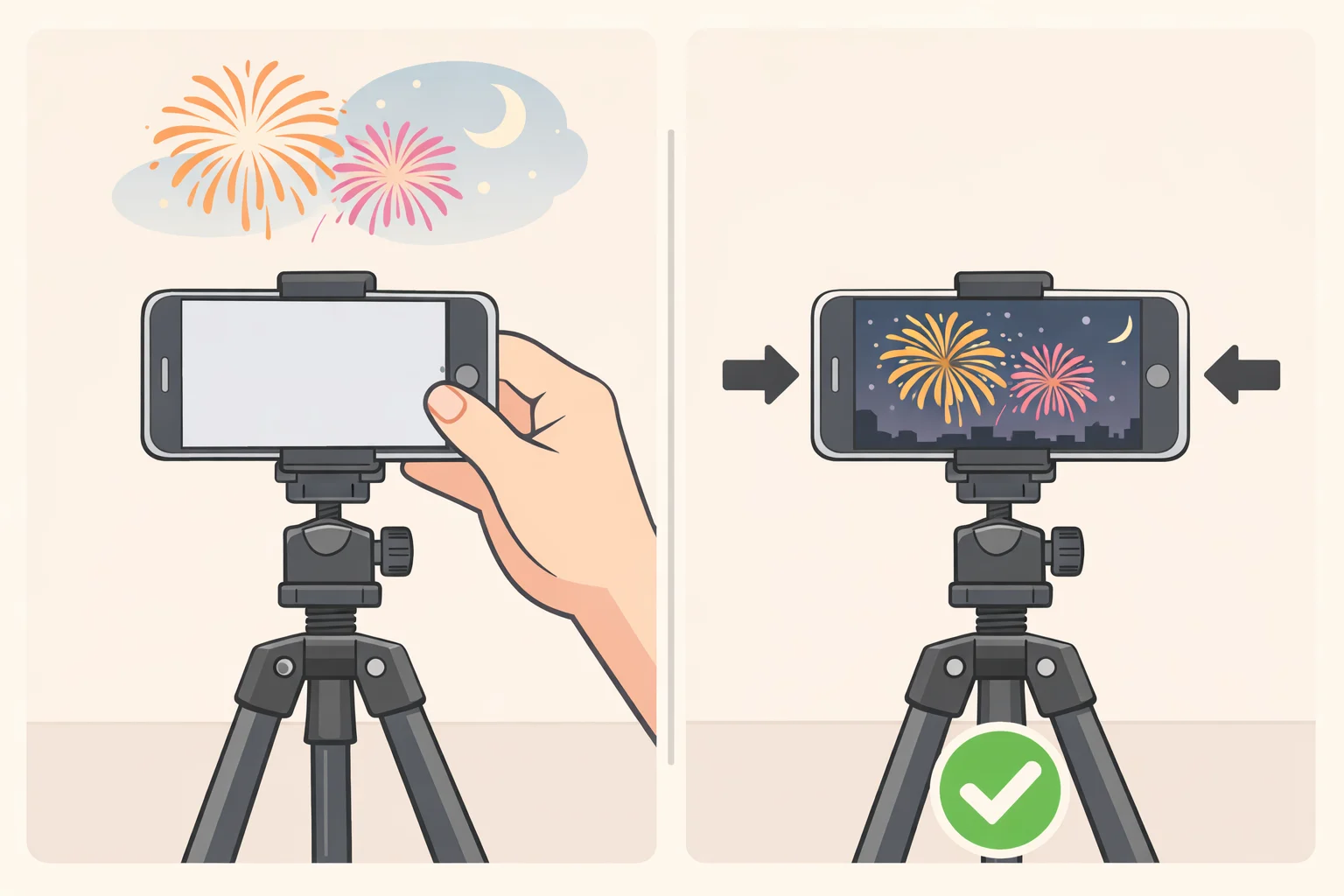
In low light, the phone holds the shutter open longer to gather enough light. The smallest movement during that window, a breath, a tap, smears the entire frame. Fresh from Cache found through testing that stability fixes more bad fireworks photos than every setting combined.
A small phone tripod or clip mount gives the most consistent results. No tripod? Find something solid: a railing, a low wall, a bag on the ground, a car roof. The surface doesn't matter as long as it doesn't move. This is exactly how Specht and King shot the fireworks images published in PetaPixel last year, on a Pixel 8 Pro, no tripod, braced against props.
Fully handheld is the last resort. If it's the only option: hold with both hands, tuck elbows into your sides, lean your back against something solid, and exhale slowly before you tap. A Bluetooth shutter remote removes tap-induced shake entirely, per Debbie Photos. A two- or three-second self-timer works too. Fresh from Cache found that keeping hands off the phone at the moment of capture reduced handheld blur significantly.
Samsung Magazine put it plainly: the sharper you want the photo, the more stable the phone needs to be. No setting compensates for movement.
Fix 2: lock focus and darken the sky
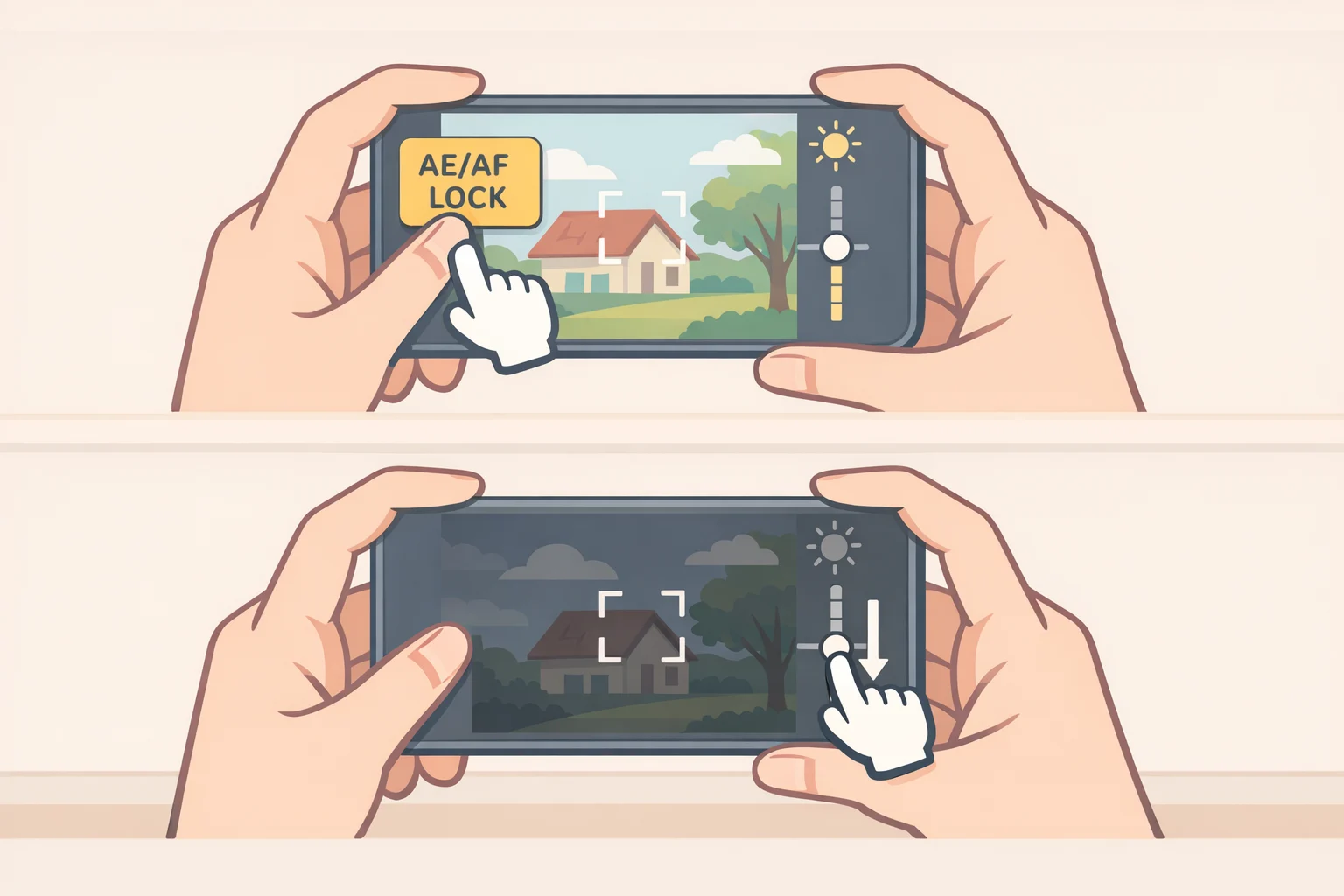
This is the step almost nobody takes. It makes the biggest visible difference.
Left on automatic, the phone interprets a dark sky as a problem and brightens the frame. When a firework bursts into that over-brightened preview, the explosion becomes a white blob with no color. Meanwhile, autofocus keeps hunting between shells, often settling on nothing when the next one fires. Locked focus plus a deliberately darkened frame is what Fresh from Cache calls the combination almost nobody finds, and it's what keeps a burst sharp and full of color instead of washed out.
On iPhone: Point at the patch of sky where fireworks will appear. Press and hold until "AE/AF Lock" appears at the top of the screen. Both focus and exposure are now frozen. Then drag the sun icon downward until the preview looks a little darker than seems right. That intentionally dark frame is correct; when a burst fires into it, the colors will be vivid rather than blown. Focal Fun identified this as the single most important iPhone technique, noting that locking AE/AF stops the phone from readjusting brightness between every burst, which is one of the most common reasons fireworks shots fail. For a reliable lock point, Debbie Photos recommends pressing and holding on a distant light, a building edge, or the area just below where fireworks will appear, anything with enough contrast for the autofocus system to register.
On Android/Samsung: Press and hold the sky area to lock focus, then drag the sun or exposure slider down. Samsung's Pro mode gives direct access to both focus and exposure for more precision. Samsung Magazine recommends the same approach: disable autofocus and reduce exposure before the show begins using the sun slider in the standard camera app.
Don't tap the screen again to "fix" the dark preview. The lock is working. Leave it until the show ends.
Fix 3: turn off flash and avoid digital zoom
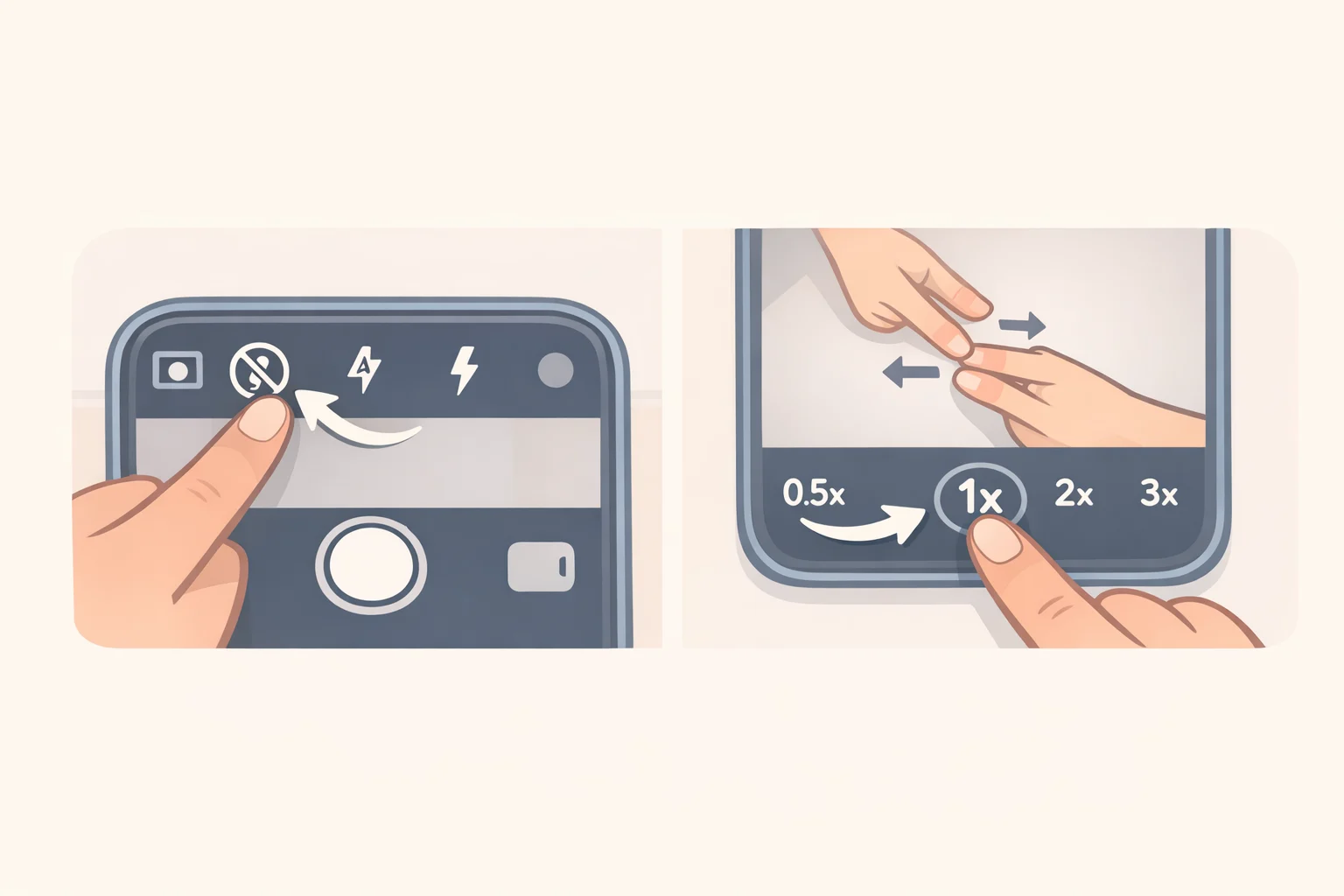
Both feel like they should help. Both actively make fireworks photos worse.
Flash: The phone's flash is designed to light nearby subjects. Fireworks are hundreds of feet away. It does nothing to the subject but illuminates nearby smoke and haze, lights up people standing next to you, and introduces a shutter delay that causes you to miss the peak of the burst, per Focal Fun. Samsung Magazine stated it directly: if auto flash fires during a fireworks shoot, no other technique salvages the resulting images. Set it to Off, not Auto, and leave it there.
Digital zoom: Pinching to zoom doesn't magnify the scene. It crops a lower-resolution portion of the sensor and enlarges it, destroying detail in the process. Fresh from Cache tested this and found pinch-zoom turns fireworks "to paste." Shoot at 1x. Crop later in editing and you'll preserve far more detail.
The exception is optical zoom: the labeled 2x, 3x, or 5x buttons on phones with multiple physical lenses. Those switch to a separate hardware lens and maintain image quality. They're usable, but only when the phone is fully stabilized, because a telephoto lens amplifies shake the same way it amplifies the image. Debbie Photos recommends avoiding the pinch slider beyond those labeled stops unless you're capturing a memory rather than a keeper.
How to take fireworks photos with your phone: framing, timing, and built-in modes
With the three fixes in place, everything else is about making the most of the foundation you've built.
Framing: Fireworks expand faster than you expect. Shoot wider than seems necessary. Dedicate the top two-thirds of the frame to sky above the launch point and anchor the bottom third with something real, a treeline, the crowd, a waterline, a skyline. That context is what separates an interesting photograph from a light pattern on black, as both Fresh from Cache and Debbie Photos recommend. Vertical framing works when fireworks climb high into a clear sky; horizontal works when a skyline or crowd scene adds meaning. One shot worth trying, from Specht via PetaPixel: turn around and photograph the crowd watching, using the fireworks as your light source. The obvious subject isn't always the best one.
Timing: Tap the shutter when you see the shell rising, not when it explodes. There's a processing delay between tap and capture, and a burst takes a second or two to fully bloom. By the time you see the peak, you've already missed the ideal window, as Fresh from Cache confirmed. Shoot early, shoot often, expect most frames to miss. The grand finale looks spectacular in person and photographs worst: accumulated smoke, overlapping bursts, and blown exposure combine into a mess. Keepers almost always come from the middle of the show, when the sky is cleaner and each burst has room to breathe.
Built-in modes:
iPhone: Live Photos is the lowest-risk starting point. Shoot with it enabled; afterward, open the image in Photos, tap the Live label, and select Long Exposure. Results vary on fast bursts, but it costs nothing to try and gives you two options from one shot, per Focal Fun. Burst Mode, hold the shutter button, is better when the show is fast and unpredictable. Night Mode can work for dimmer, distant fireworks, but during bright finales it tends to over-expose and collect too much smoke. Handheld, keep the exposure time short, per Debbie Photos.
Google Pixel: Long Exposure mode, found next to Action Pan in the mode strip, is a convenient starting point. It works by stacking frames algorithmically rather than holding a true open shutter, so results can look slightly stuttered on fast bursts, as Fresh from Cache found through testing. For full control, Pro Controls let you set a manual shutter speed: shorter exposures produce defined bursts with tight trails, longer ones produce sweeping arcs. Set ISO to around 100 to keep dark areas clean. This requires a tripod or solid surface. King told PetaPixel last year that shutter speed was his primary creative variable: the look is a deliberate choice, not a byproduct of luck.
Samsung Galaxy: Night mode activates automatically and handles fast flashes reasonably well on newer models, including the Galaxy S23 and S24, per Samsung Magazine. Pro mode gives direct access to shutter speed, ISO, and focus for more control.
Other Android phones: Most have Night or Long Exposure modes that work by frame-stacking, which produces good-looking results even if the mechanism differs from a dedicated camera. Motorola's built-in Pro mode won't slow the shutter past roughly a quarter second, not enough for visible trails, so a third-party camera app is needed for that look on Moto hardware, per Fresh from Cache.
Your one-minute fireworks photo checklist
Run through this before the first launch:
- Lens wiped, position confirmed, wind direction checked
- Phone stabilized (tripod, prop, or controlled handheld)
- Flash: Off
- AE/AF locked on the sky, exposure dragged down to slightly dark
- Zoom: 1x (labeled optical zoom only if phone is fully stabilized)
- Mode: Live Photos or Burst for iPhone handheld; Long Exposure or Pro Controls for Pixel/Samsung with stable support
- Start shooting from the first burst; your keepers will come from the middle of the show
The best fireworks shots don't require better hardware. As Focal Fun put it: most great shots come from knowing when to shoot, not from owning better gear. Tomorrow night, the only difference between the photos you've taken before and the ones you'll take now is two minutes of setup.