How to Securely Wipe Files from a Flash Drive: A NIST-Based Guide
If you're looking for a utility to securely erase specific files from a USB flash drive, here's the uncomfortable answer upfront: most secure-delete tools cannot reliably give you that guarantee. Not because the software is poorly written, but because of how flash storage works at the hardware level. This guide walks you through how to securely wipe files from a flash drive based on where the drive is going next and explains why that decision almost always means wiping the whole drive, not targeting individual files.
Before continuing, answer one question: what happens to this drive after you wipe it? That single answer determines which method applies.
If you only read one section, read this
Video of the Day
Three scenarios, three methods. Pick the one that matches your situation.
Keeping the drive yourself? Wipe the entire drive using organizationally approved and tested overwrite tools running at least two passes a pattern, then its complement per NIST SP 800-88r1. This is the prescribed approach for clearing USB removable media. Clearing means the drive must resist recovery by ordinary file or disk recovery utilities, per IRS Media Sanitization Guidelines updated earlier this year. Then verify.
Handing it off, repurposing it, or returning it? Software purge is usually not achievable on USB flash drives. Most devices either don't support standardized sanitize commands at all, or implement them inconsistently. NIST SP 800-88r1 is explicit: for most cases where purging is desired, USB removable media should be destroyed.
Discarding the drive entirely? Destroy it. Physical destruction shredding, disintegration, pulverizing, incineration, or melting is the required method when the drive will not be reused, per IRS guidelines.
Methods that don't work and should be ignored: deleting files and emptying the trash, quick-formatting the drive, using a per-file secure-delete tool without a full-drive pass, and degaussing. On flash storage, degaussing isn't just ineffective NIST SP 800-88r1 prohibits it outright as a sanitization technique, and the IRS confirms it is not an appropriate purge method for flash media.
Video of the Day
Why you can't reliably wipe specific files from a flash drive
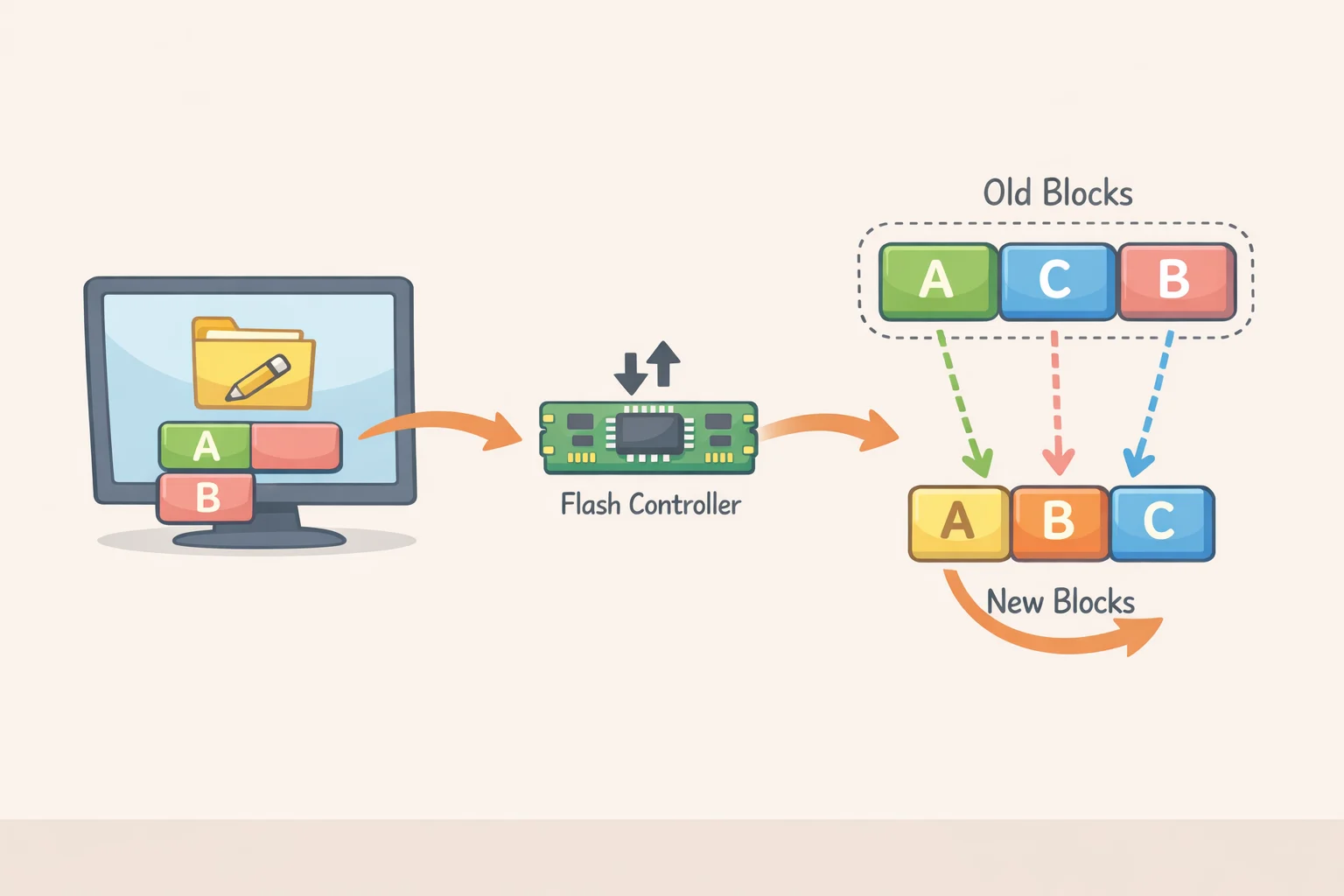
Flash drives don't write data where you tell them to. The controller inside the drive manages something called wear leveling it distributes writes across the physical memory chips to extend the drive's lifespan. When software overwrites a specific file, the controller may write the new data to a completely different physical block, leaving the original data sitting in an area the operating system can no longer address directly. A file-level secure-delete tool operates at the OS layer and has no visibility into what the controller did underneath it. The original data may still be there.
This isn't a software problem that better tools will eventually solve. It's a consequence of how flash memory is architected.
That's why the right frame for this problem isn't "which secure-delete tool should I use" it's "what level of assurance do I need, and does my method actually deliver it." NIST SP 800-88r2, published last September, defines media sanitization as rendering access to target data infeasible for a given level of effort. That's an outcome standard. Clicking a button labeled "secure delete" is not.
The three recognized sanitization levels Clear, Purge, and Destroy map directly to who might ever get access to the drive. Think of them as locking a filing cabinet, shredding its contents, and incinerating the shreds. The right level isn't determined by how confident you feel; it's determined by the drive's next destination.
Clear uses standard read/write commands to overwrite all user-accessible storage locations. The bar is practical: cleared media must resist recovery by ordinary data recovery software, per IRS guidelines. For USB removable media specifically, NIST SP 800-88r1 specifies at least two overwrite passes using organizationally approved and tested tools, with a pattern in the first pass and its complement in the second. Additional passes are permitted.
Purge must defeat state-of-the-art laboratory recovery techniques a substantially higher bar. The problem is that most USB flash drives can't meet it through software alone. Standardized sanitize commands are either absent or inconsistently implemented across devices. IRS guidance ties this level to any situation where the drive leaves organizational control or is repurposed for a non-sensitive function.
Destroy renders data unrecoverable by any technique and permanently ends the drive's usability. Required when the drive will not be reused.
One note on sources: the two-pass overwrite specifications for USB media come from the appendix tables in SP 800-88r1. The 2025 revision, SP 800-88r2, replaced most tool-level sanitization details with references to IEEE 2883 and NSA specifications so for USB-specific procedure, r1 remains the operative reference.
Executing the right method at each decision point
Step 1: Wipe the entire drive, not individual files
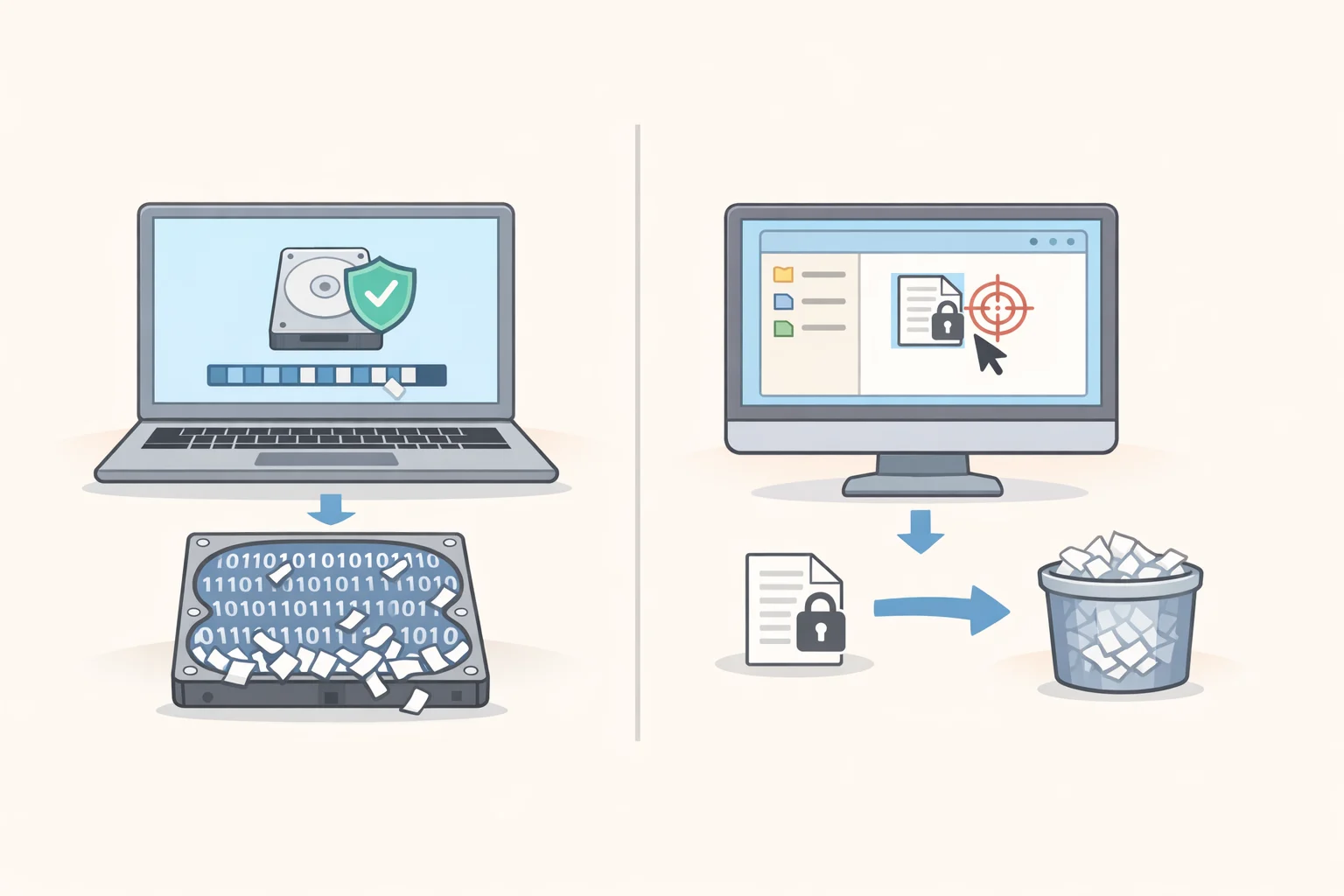
Any overwrite operation must target the full device, not the mounted filesystem. A tool that securely deletes a specific file is operating at the OS level; the flash controller below it may have already moved that data elsewhere on the chip.
Look for tools that run at the device or volume level, perform multi-pass overwrites with complementary patterns, and explicitly report pass completion. Avoid anything described only as a "secure file eraser" without specifying full-drive coverage. Quick-format options on any platform do not meet clearing standards.
After wiping, reformat the drive if it will remain in use.
Step 2: Verify and understand what verification actually proves

Run a consumer file recovery tool against the drive after any clearing operation. If it surfaces readable files, the sanitization failed. Repeat with additional passes or reconsider the method.
Passing that check confirms protection against ordinary tools. It does not confirm purge-level sanitization. IRS guidance describes verification as an essential step in confirming media was properly sanitized. For drives that held sensitive data and are leaving your control, no software verification can close the gap between clearing and purging only manufacturer-verified sanitize command support or physical destruction can do that.
Document the process: tool used, number of passes, verification tool, and result. This record matters if you ever need to demonstrate due diligence.
Step 3 (conditional): Cryptographic erase for hardware-encrypted drives only
Skip this step if the drive does not use verified hardware encryption.
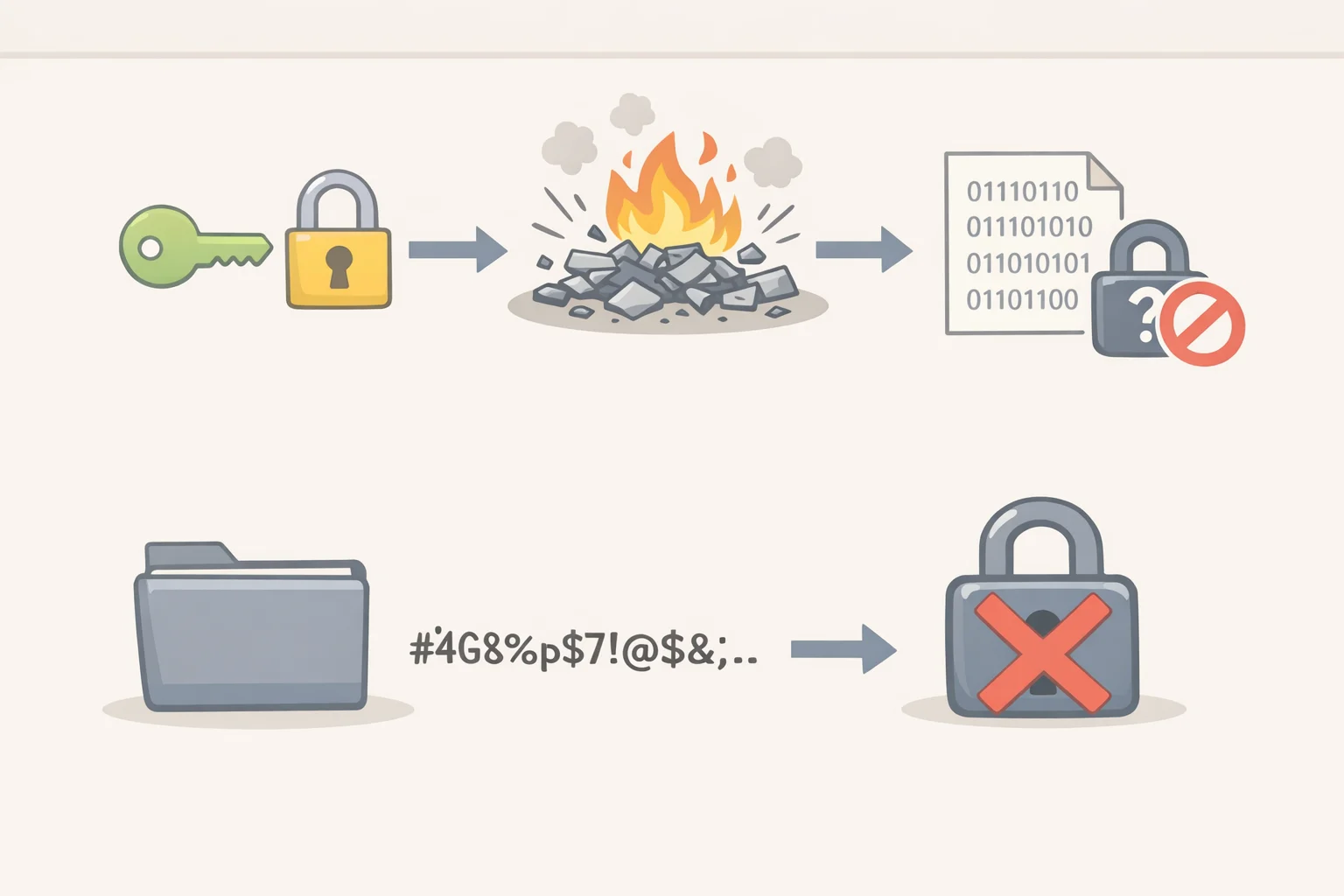
Cryptographic erase (CE) works differently from overwriting. Instead of replacing data, it destroys the encryption key, leaving ciphertext on the drive with no decryption key. NIST SP 800-88r1 describes this as effectively sanitizing the data and notes it can typically be completed in a fraction of a second.
The catch: CE is only trustworthy when the encryption key was never backed up or escrowed outside the device. If a copy of the key exists anywhere, CE does not complete the sanitization. NIST recommends CE be used in combination with another sanitization method unless there is high confidence that all key copies were destroyed in the process. SP 800-88r2 expanded this guidance to address key zeroization per ISO/IEC 19790 and to clarify when externally managed keys are potentially acceptable, per NIST's September 2025 announcement.
For most consumer flash drives, hardware encryption is either absent or not independently verifiable. Don't assume CE is available because a drive is marketed as encrypted. Check the manufacturer's documentation.
Step 4: When to stop trying to wipe and destroy instead
If the drive is leaving your control, the manufacturer provides no documented sanitize command support, and purge-level assurance is required destroy the drive. NIST SP 800-88r1 states this directly: for most cases where purging is desired, USB removable media should be destroyed. Physical destruction methods include shredding, disintegration, pulverizing, incineration, and melting, per IRS guidelines. For a consumer thumb drive that held sensitive data and has no further use, destruction is the most defensible answer available.
A longer-term fix: encrypted storage from the start
If the need to permanently delete files from a USB stick comes up repeatedly, the real problem may be the choice of storage medium. Flash drives without hardware encryption provide no mechanism for guaranteed per-file sanitization. That's not a gap in current software it's a hardware-architecture constraint with no software solution on the horizon.
A more durable approach: use an encrypted container or encrypted volume on the flash drive from the beginning. When sanitization is needed, cryptographic erase of a properly managed key can satisfy clearing requirements almost instantly, per NIST SP 800-88r1. No multi-pass overwrite, no waiting. The condition that makes it work key management discipline from day one is the same condition that makes all CE trustworthy.
SP 800-88r2's expanded CE guidance, published last September, reflects how much the field has shifted toward encrypted-by-design storage as flash becomes the default medium. The direction is clear: build the sanitization path in at the start, rather than hunting for a reliable eraser at the end.
What to do next
The decision tree is short. Keep the drive: full overwrite with approved tools, minimum two passes, then verify with a recovery tool. Hand it off or repurpose it: check for manufacturer-documented sanitize command support; if it's absent, destroy the drive. Discard it: destroy it.
For regulated data environments or organizational use cases, consult NIST SP 800-88r2 directly it now defers to IEEE 2883 and NSA specifications for tool-level details and adds updated CE requirements that may apply depending on your compliance framework. Check applicable requirements before committing to a method if the drive held regulated or sensitive data.