How to Choose an RGB LED TV: A Complete Buying Guide
RGB LED is the newest twist on backlit LCD television: thousands of tiny red, green, and blue Mini LEDs that generate color directly in the backlight, rather than relying on the white or blue backlights older sets use (Consumer Reports). It's moving fast, too. Last year, the first RGB models on the market, from Hisense and Samsung, carried list prices between $20,000 and $30,000 (How-To Geek). Consumer Reports now describes the category as moving into "more practical sizes," with Samsung's R95H and R85H reportedly starting at 55 inches (Consumer Reports).
If you're trying to figure out how to choose an RGB LED TV without getting talked into marketing noise, this guide covers what the technology actually does, what its brightness and color claims mean in practice, which rooms it genuinely suits, and what to verify on the exact model before paying the premium.
The same underlying idea goes by different names depending on who's selling it: Samsung calls its version Micro RGB, LG calls it Micro RGB evo, Hisense calls it RGB MiniLED, and Sony is reportedly settling on RGB LED for its own sets (Consumer Reports; How-To Geek). Consumer Reports groups all of them with LED, QLED, and QNED sets rather than with OLED, describing them plainly as "LCD/LED displays with a new way to display colors" (Consumer Reports). The same report is blunt about the marketing around them, warning that some of the language is "designed to make certain TVs seem more advanced than they truly are." Reliable street pricing for comparable RGB and Mini LED sets isn't available yet, so this guide treats "worth it" as a question about your room and habits, not a dollar-for-dollar calculation.
RGB LED, decoded: the technology behind the marketing names
Video of the Day
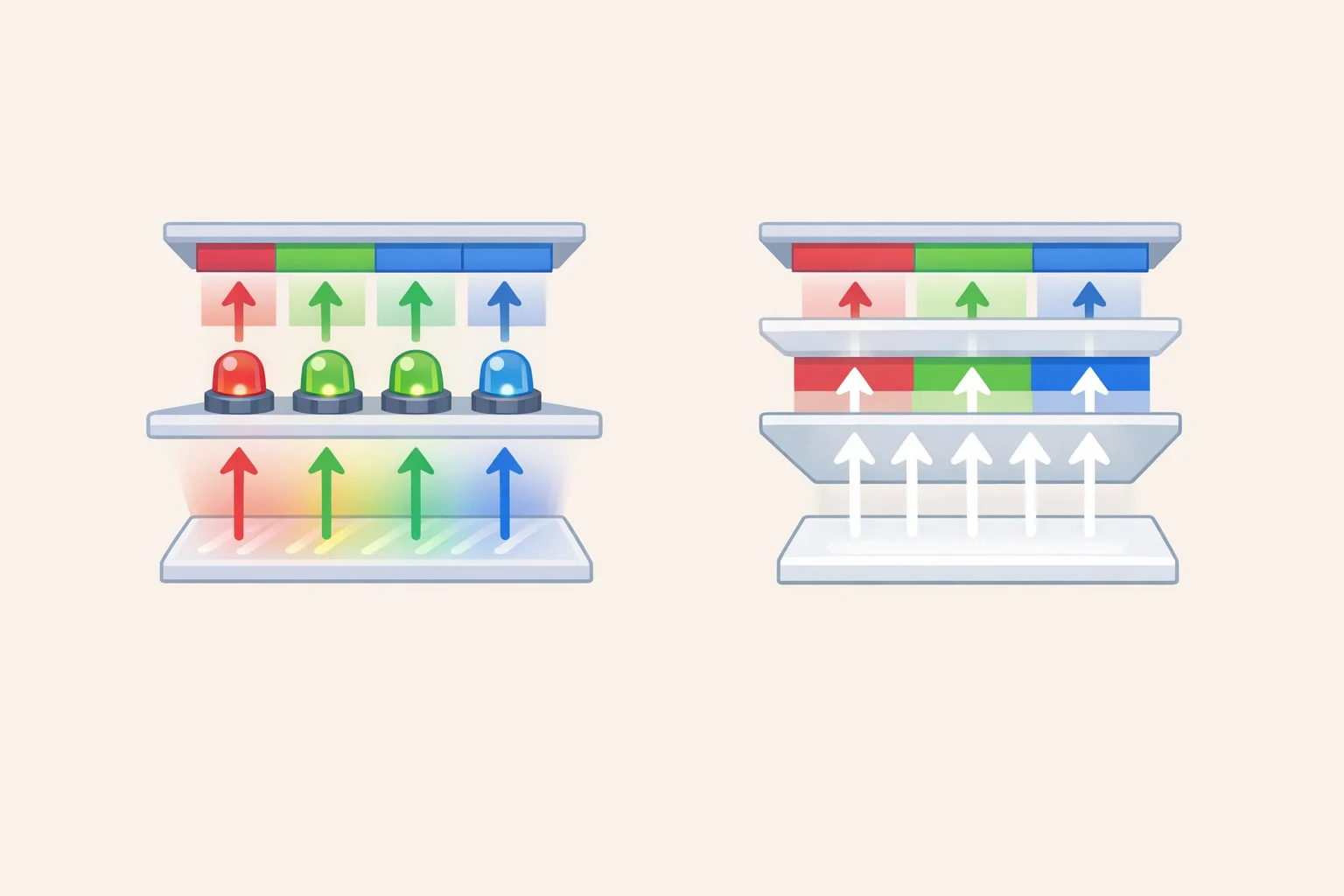
Despite the branding, there are really only two fundamental TV technologies. OLED is self-emissive, meaning each pixel produces its own light. Everything else is backlit LCD, where a separate light source shines through a layer of liquid crystals (Consumer Reports). RGB LED is a variant of the second category, not a third option competing on equal footing with OLED.
Conventional Mini LED TVs shine a white or blue backlight through a color filter or a layer of quantum dots. RGB LED TVs add dedicated red, green, and blue LEDs to the backlight itself, producing color more directly. The available descriptions of exactly how differ: Consumer Reports says RGB sets still pair those LEDs with a color filter, while How-To Geek describes RGB Mini LED as typically skipping filters altogether (Consumer Reports; How-To Geek). Check the manufacturer's technical spec sheet for the model you're actually considering rather than assuming one description applies across the board.
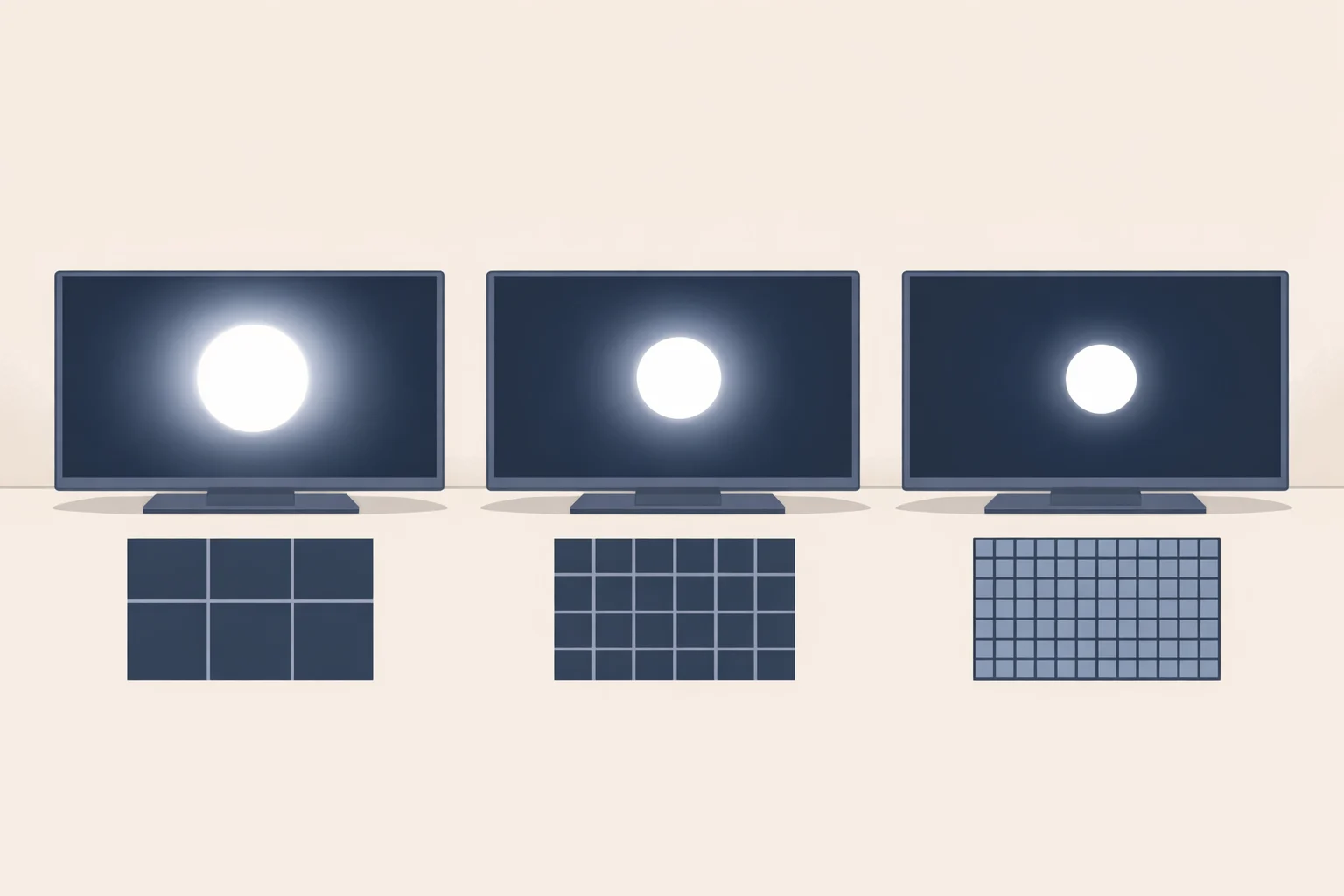
There's also a built-in ceiling. RGB LED TVs still have far fewer LEDs than pixels on the screen, so they rely on local-dimming zones, groups of LEDs that brighten or dim together, rather than pixel-by-pixel control. That's a real step up from older LCD backlighting, but it's not a leap to OLED-style precision, and the limited number of dimming zones still restricts contrast ratio compared to a self-emissive panel (How-To Geek).
One naming trap is worth flagging on its own: Samsung's Micro RGB has nothing to do with MicroLED, a separate and unrelated display technology, despite the nearly identical name. How-To Geek calls this out specifically because it's an easy mistake to make at the sales counter (How-To Geek). None of this makes RGB LED a bad television. It makes it a premium LCD variant with specific, real advantages, which is the frame for everything that follows.
Video of the Day
The 10,000-nit question: peak brightness vs. what you'll actually see
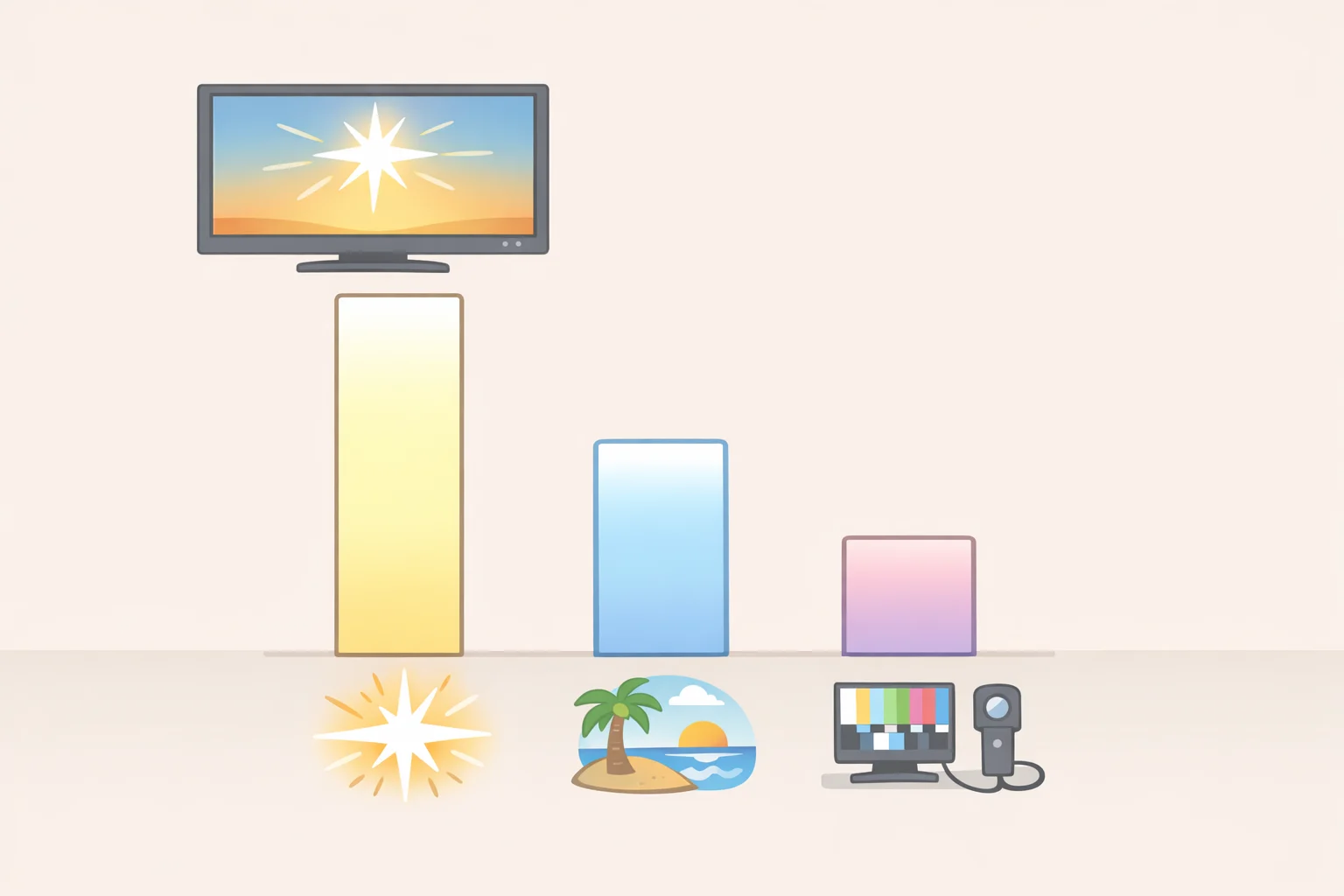
Manufacturers market RGB LED sets at up to 10,000 nits of peak brightness. For context, most 4K HDR content is mastered at 1,000 nits, with some Dolby Vision titles reaching 4,000 (Consumer Reports). That headline number is far above the mastering level of most 4K content available today.
Peak-brightness numbers also aren't the whole story, which is exactly why Consumer Reports tests brightness and color accuracy in its own labs using a $40,000 spectroradiometer rather than trusting the box (Consumer Reports). How-To Geek's own comparison shows the gap running the other way, too: OLED currently tops out around 2,500 nits in a 10% test window, while Hisense's 116UX RGB LED model measured over 5,500 nits under the same conditions (How-To Geek). That's a genuine advantage, well short of the 10,000-nit ceiling but still meaningful.
Where the extra brightness matters most is in rooms with a lot of ambient light. RGB backlights typically skip the light-absorbing color filter used in conventional sets, which is roughly how they push more usable brightness to the screen and counter glare and reflections, including with HDR content (How-To Geek).
Color-gamut claims deserve the same scrutiny. Hisense's 116UX reportedly covers 95% of the BT.2020 color space, versus roughly 76% for the company's own conventional Mini LED U9N, while current OLED sets top out around 80% coverage, according to RTINGS measurements cited by How-To Geek (How-To Geek). That's a real gap on one specific model comparison, not a verified rule for the whole category. Treat it as a data point to confirm on whichever TV is actually on your list.
Nits and gamut percentages are the numbers manufacturers lead with. What matters in an actual living room is sustained brightness, glare handling, and viewing angle, and the right technology for those depends entirely on the room itself.
How to choose an RGB LED TV for your room
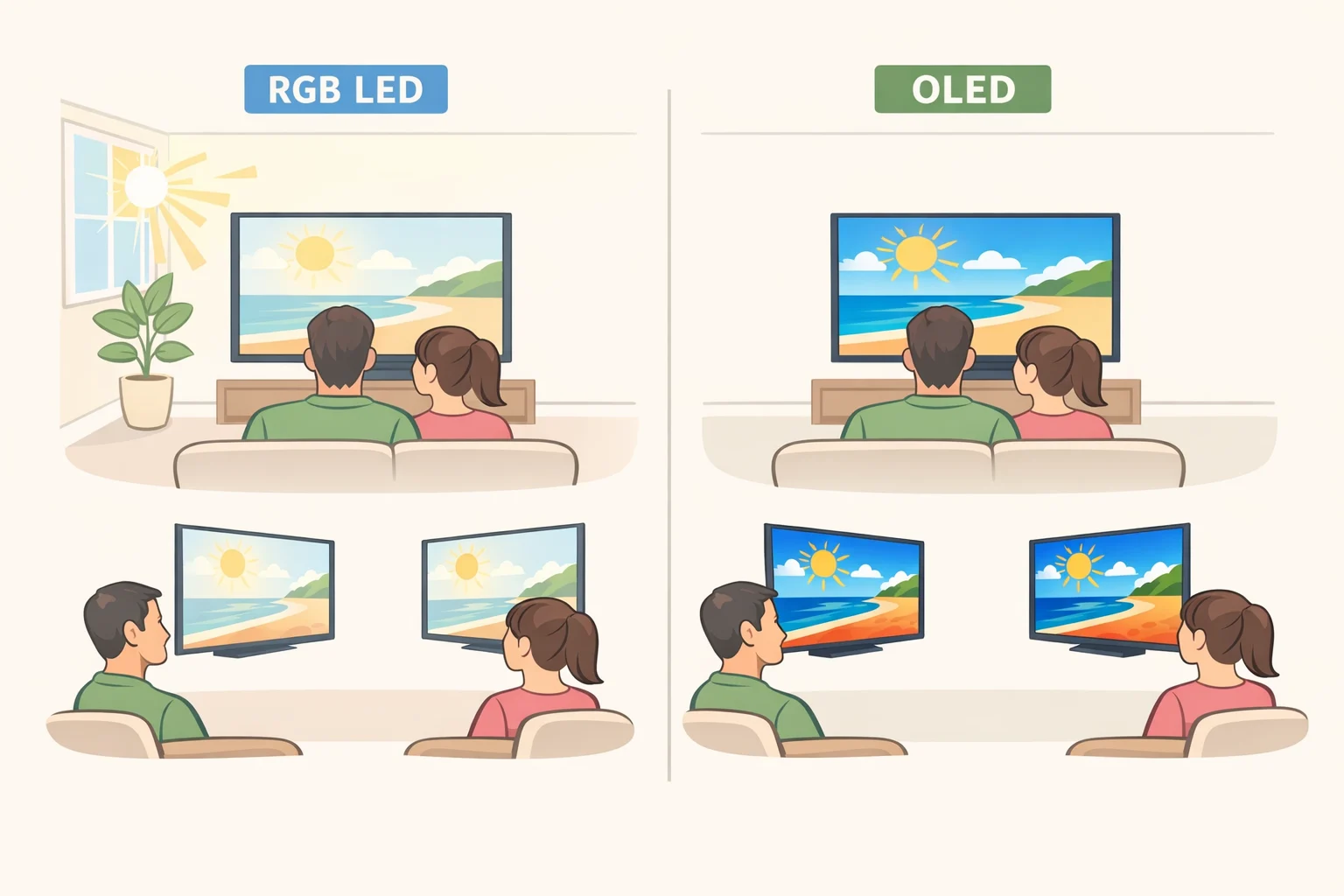
Bright, sunlit living room, front-facing seating. This is RGB LED's best case. Direct RGB backlighting is built to counter glare and reflections that wash out darker-performing sets, and the extra brightness may offer real headroom over conventional Mini LED, since RGB backlights typically skip the filter that caps how much light standard sets can push through (How-To Geek). Before buying, compare full-screen brightness and reflection handling in independent reviews of the exact model rather than relying on the spec sheet.
Dark, dedicated viewing room. OLED remains the reference point. Its pixels emit their own light and can switch off individually, producing true blacks and contrast that no backlit LCD, RGB LED included, has matched yet (Consumer Reports). In a genuinely dark room, OLED's black-level advantage is likely to matter more day to day than RGB LED's extra brightness.
Wide couch or multi-angle family room seating. OLED offers essentially unlimited viewing angles. RGB LED sets typically use VA-type LCD panels, the same panel type found in conventional Mini LED TVs, which lose color and contrast off-axis (Consumer Reports; How-To Geek). Sit in the seats furthest off-center from wherever the TV will go and check a bright image from there. RGB LED doesn't solve this limitation any better than a good conventional Mini LED does.
Very large screens, 100 inches and up. OLED has been stuck around 97 inches at the top end, while Hisense and LG already offer RGB models in the 100- to 116-inch range (How-To Geek; Consumer Reports). RGB LED and Mini LED are among the few technologies that scale to that size at all, for now, and How-To Geek's reporting suggests it should get easier for manufacturers to push RGB into new sizes as the category matures.
Gaming setups. Backlight technology matters less here than refresh rate, Auto Low Latency Mode, and variable refresh rate, none of which are exclusive to any one panel type (Consumer Reports). Confirm ALLM and VRR are actually supported on the specific model and inputs you plan to use for console or PC gaming before assuming they're included.
The same checks apply if you're learning how to buy an LED TV for home use more broadly: room light, seating, size, and measured performance come before any label on the box.
There's no single best RGB LED TV for home viewing, since so much depends on the room. Here's how the category stacks up against OLED and conventional Mini LED:
| Technology | Best for | Main advantage | Main compromise |
|---|---|---|---|
| RGB LED | Bright rooms, very large screens | Wider color gamut, potential for higher sustained brightness | Few models, thin independent testing, price premiums reported on early sets |
| OLED | Dark rooms, wide seating | True black levels, unlimited viewing angles | Lower peak brightness ceiling, capped around 97 inches |
| Conventional Mini LED | Value-focused buyers | Mature, well-tested local dimming, often priced below premium RGB or OLED sets | Narrower color gamut than RGB models claim |
Skip RGB LED if the room is mostly dark, the seating is wide or off-axis, independent test results for the exact model don't exist yet, or a discounted, well-reviewed premium Mini LED or OLED already covers what matters to you at a lower price (Consumer Reports; How-To Geek).
Before you buy: LED TV features to consider
Once the technology matches your room, run the specific model through this checklist before paying the premium.
-
Calculate size and distance first. Use roughly one foot of viewing distance for every 10 inches of screen size, aiming for the 30- to 40-degree field of view recommended by SMPTE and THX. This determines whether a large RGB LED set is even practical in your room before technology comparisons matter (Consumer Reports).
-
Test the specific model on measured numbers, not box claims. Consumer Reports' lab testing covers peak brightness, color accuracy, contrast at multiple viewing angles, and motion blur (Consumer Reports). For any RGB LED set you're seriously weighing, look for:
- a full-screen or sustained brightness figure alongside the peak-nit number, if either is reported
- measured color accuracy, not just a BT.2020 coverage percentage
- visible blooming around subtitles, credits, or bright stars against a dark background
- contrast and color shift when viewed from the side seats, not just dead center
- confirmed ALLM and VRR support on the inputs you'll actually use
- the actual street price stacked against a comparable OLED and conventional Mini LED at the same screen size
-
Check local-dimming zone count and blooming behavior, model by model. Implementation varies within the RGB LED category itself. Samsung reportedly uses smaller LEDs and tighter backlight control than Hisense's RGB models, which changes how visible halos and blooming are around bright objects (How-To Geek). A review of one manufacturer's RGB LED TV tells you little about another's.
-
Expect a price premium, but confirm it model by model. TCL's newest high-end Mini LED sets skip RGB LEDs entirely in favor of a reformulated quantum dot layer, and even those cost more than TCL's own conventional Mini LED lineup across the board (Consumer Reports). That's a data point about premium Mini LED pricing generally, not proof of an RGB-specific markup. The clearest RGB figure remains the historical one noted earlier: the first RGB models listed for $20,000 to $30,000 less than a year ago (How-To Geek). Neither figure tells you what a mainstream-sized RGB set costs against a comparable Mini LED today; check the actual gap for the sizes you're weighing.
-
Confirm gaming and connectivity needs regardless of panel type. Check for ALLM and variable refresh rate support, which prevent input lag and screen tearing (Consumer Reports).
-
Check the smart platform's privacy and security score. Consumer Reports evaluates how TV brands collect, use, and protect viewer data as part of its overall ratings. Factor that in alongside picture quality (Consumer Reports).
-
Verify what's actually available, and don't assume model names have stayed put. LG's Micro RGB evo lineup is available in 75-, 86-, and 100-inch sizes, Hisense offers RGB in its UR8 and UR9 series plus the 116-inch 116UXS, and Samsung has unveiled 55-inch R95H and R85H models alongside a 130-inch flagship (Consumer Reports). That's a newer lineup than the Hisense 116UX and Samsung R95 models that carried five-figure price tags when How-To Geek first covered them last year (How-To Geek). Confirm which generation of a given model name is actually on shelves before you shop.
-
Time the purchase. Consumer Reports names November and December as the best months to buy, and recommends checking for a 30-day price guarantee to protect against a price drop right after purchase (Consumer Reports).
Buy now, choose OLED, or wait
Three straightforward paths, depending on what's already true about your room and how much patience you have for an early-generation category.
Buy an RGB LED TV now if the room gets a lot of daylight, you want a screen 100 inches or larger, and you can find independently measured performance data for the exact model on your list. That's the scenario where the category's brightness and color-gamut advantages actually show up on screen (How-To Geek).
Choose OLED instead if the room is genuinely dark most of the time or the seating is wide and off-axis. Self-emissive pixels and unlimited viewing angles solve problems no backlit LCD, RGB included, has matched yet (Consumer Reports). 2026 WOLED and QD-OLED models from LG, Samsung, and Sony have also pushed OLED's own peak brightness higher than earlier generations, though nothing in the current reporting sets up a direct, measured matchup against RGB LED (Consumer Reports).
Choose conventional Mini LED, or wait, if the RGB premium looks steep for your budget and independent testing for the specific model isn't available yet. Implementation still varies meaningfully by manufacturer, from filter design to LED count to dimming-zone control, and that variation alone is reason enough to review the exact model rather than buy on the RGB name (How-To Geek).
The room you're putting the TV in decides more than the label on the box.