How to Find Out if You Were Flocked by License Plate Cameras
Drivers who ask have you been Flocked, or search for how to find out if you were Flocked, often land on a site called Have I Been Flocked. What it can actually confirm is narrower than the name suggests. It's a lookup built on disclosed audit logs, and neither its operator nor the full extent of its coverage is documented in the materials available for this piece. The honest answer, for most people right now, is still "we don't know yet." The tool can only surface searches that have already been obtained through public-records requests. It can't see every camera that has ever photographed a car.
That's because this Flock Safety camera lookup follows the same audit-log methodology a North Carolina transparency project, DeFlockILM, laid out in detail: reading the CSV spreadsheets Flock's platform makes available through its Insights tab (DeFlockILM, earlier this summer). The clearest documented example of what that coverage can look like comes from New Hanover County, North Carolina, where a records request surfaced roughly 2.98 million logged searches of the county's camera network over 16 months (DeFlockILM, earlier this summer). Whether Have I Been Flocked's own coverage extends meaningfully beyond that county isn't established anywhere in the sources reviewed here.
The scale of what's being searched is why the question matters at all. Flock operates more than 120,000 automatic license plate readers, or ALPRs, across the country, feeding a network agencies can query across jurisdictional lines (ACLU, last week). The ACLU's amicus brief in a pending federal appeal argues that this data gets aggregated into interconnected databases, queryable retrospectively for weeks, months, or even years (ACLU, earlier this year). That's an argument made to a court, not a settled fact, but it gives a sense of the stakes.
This piece walks through what the lookup tool draws on, how to file your own records request if your area isn't covered, and, just as important, what it means when the search comes back empty.
What a Flock Safety camera lookup actually checks
Video of the Day
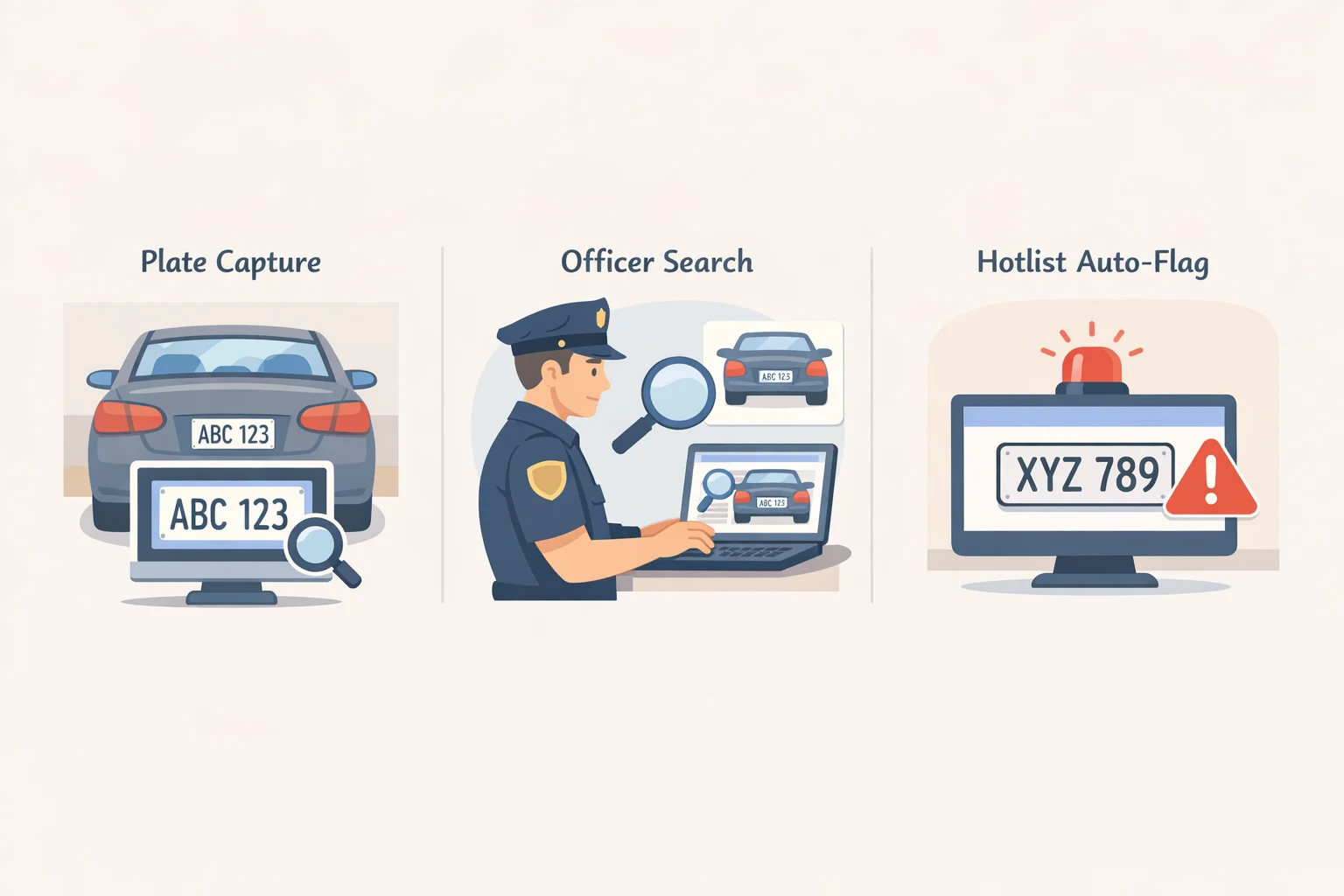
Three separate things can happen when a car passes Flock Safety license plate reader cameras. The camera captures the plate. An officer searches for that plate later. A hotlist automatically flags it if it matches a preexisting list. Have I Been Flocked, and the audit logs it's built on, cover only the middle event: searches. A camera can photograph a plate a thousand times without any of those images showing up in a search log, and a hotlist match can fire without an officer typing a single query.
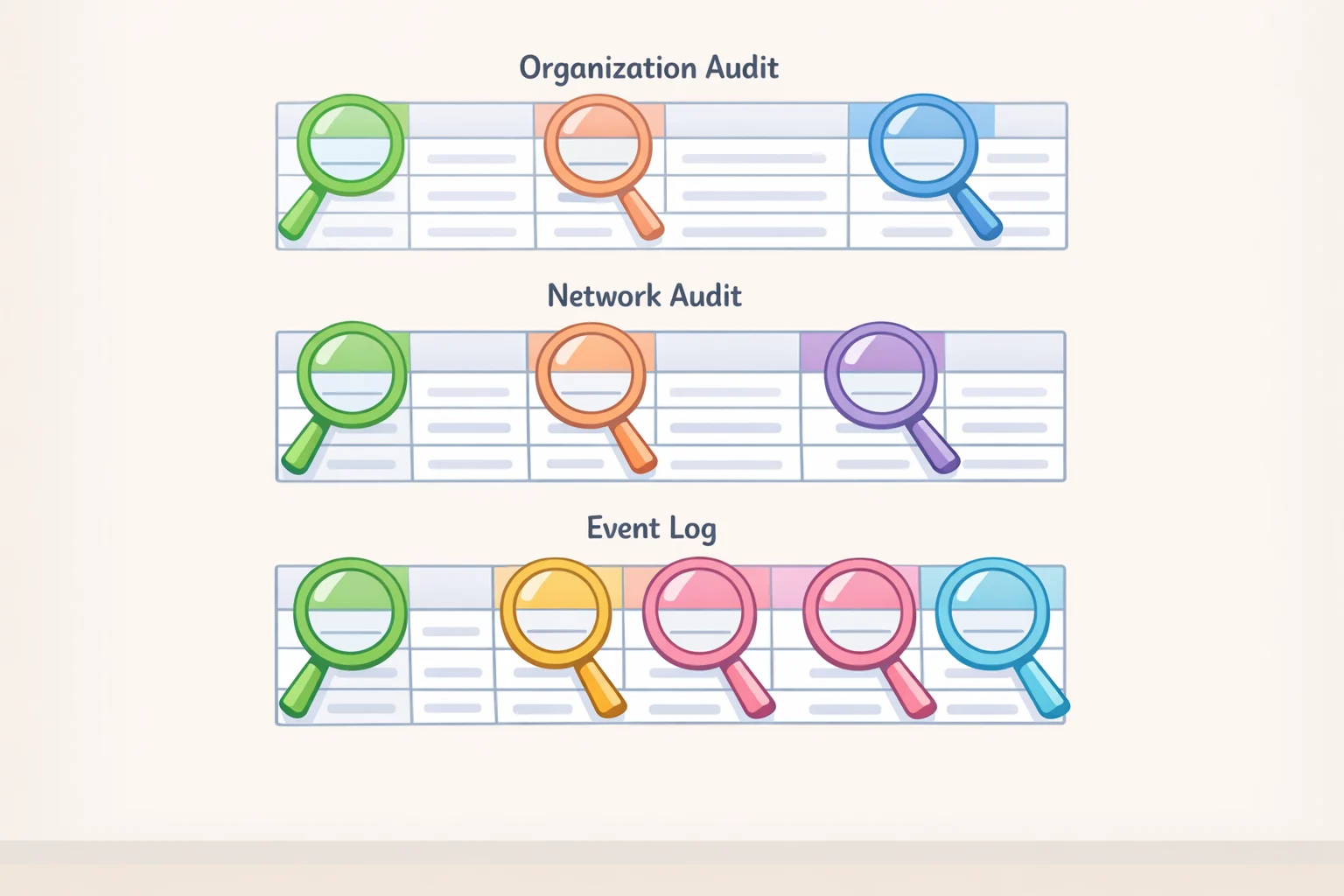
Flock's platform makes three relevant reports available for export, as CSV spreadsheets pulled from its Insights tab: an Organization Audit (searches an agency ran on its own cameras), a Network Audit (searches other agencies ran against that agency's cameras), and an Event Log (logins, exports, configuration changes) (DeFlockILM, earlier this summer). The lookup tool works from these audit exports, not from the underlying camera-capture database.
That distinction has a practical consequence. If your local agency's audits haven't been obtained through a records request yet, the tool has nothing to show you. That's a coverage gap, not proof that no camera ever saw your car.
Flock has added some stated safeguards to its search process: mandatory case codes on every query, a standard "Audit Assistance" feature the company says flags abnormal search behavior, and local controls that let one agency restrict which categories of searches other agencies can run against its cameras (ACLU, last week). The "Reason" field, though, is free text an officer types by hand. An ACLU of Massachusetts review of network audits found entries like "investigation" and "susp," and one Oregon department logged "hehehe" as a search reason twenty times in a single month (ACLU, last month). A logged reason tells you almost nothing about intent.
Not every row in an audit export means the same thing, either. The "Search Type" field covers plate lookups, hotlist hits, and "Nova" person searches (DeFlockILM, earlier this summer). A row labeled "plate lookup" shows that the system recorded a query against that specific plate. A hotlist hit works differently: it can fire when a camera capture matches a list already loaded into the platform, without an officer typing anything at all. Whether every automated hotlist alert shows up as its own row in these exports isn't established in the documentation reviewed for this piece. A broad search across a time-and-camera range, or a person search naming someone else, doesn't establish anything about your vehicle specifically.
Keep that vocabulary in mind before running any search. The tool answers whether your plate was logged in a disclosed search, not whether a camera ever saw your car, and not why a search happened.
Video of the Day
How to find out if you were Flocked through Flock Safety audit logs
If Have I Been Flocked includes your agency's published audit data, it may offer a quick starting point. If it doesn't turn up anything, that's simply the signal that the request stage comes next, not a dead end.
- Gather the basics first. Your plate number and state, the agencies whose territory you likely passed through, and a rough travel window. Turning that into a defined date range is a practical suggestion, not a guarantee: New Hanover County's release, covering 16 months, ran to nearly three million rows, and a narrower window is one way to try to avoid an equally unwieldy spreadsheet (DeFlockILM, earlier this summer).
- Send the request to the agency that owns the cameras, not necessarily the one you suspect ran the search. Audits are indexed by the agency that owns the cameras, and Network Audits show other agencies' searches of that network (DeFlockILM, earlier this summer). Address the request to that department's public-records officer.
- Name all three exports explicitly. Something close to: "Under [state public records law], I request the Organization Audit, Network Audit, and Event Log exported from Flock Safety's Insights platform for [agency name], covering [date range]." North Carolina residents can use a template DeFlockILM provides; the underlying rights and exemptions vary by state, so treat this wording as general guidance rather than a guarantee your state's law requires release (DeFlockILM, earlier this summer; EFF, earlier this year).
- Read a returned row correctly. A typical CSV includes Search Time, Org Name (the searching agency), Reason, Search Type, License Plate/Text Prompt, and Case Number, which may be blank (DeFlockILM, earlier this summer). A row showing your plate under "plate lookup" with a timestamp confirms a query happened. It doesn't, on its own, confirm a stop, a referral, or misuse.
- Distinguish a full match from a partial one. A row with your plate but a blanked-out operator name or searching agency is a redacted disclosure, not an absence of a match, the kind of redaction New Hanover County applied to its own release (DeFlockILM, earlier this summer). Don't publish other drivers' plates or identifying details that turn up in the same export.
- If an agency denies the request, ask it to cite the specific statutory exemption it's relying on. That answer tells you whether you're facing a coverage gap, worth trying again later, or a legal wall worth appealing through your state's records-law process.
Why a "no result" doesn't settle the question
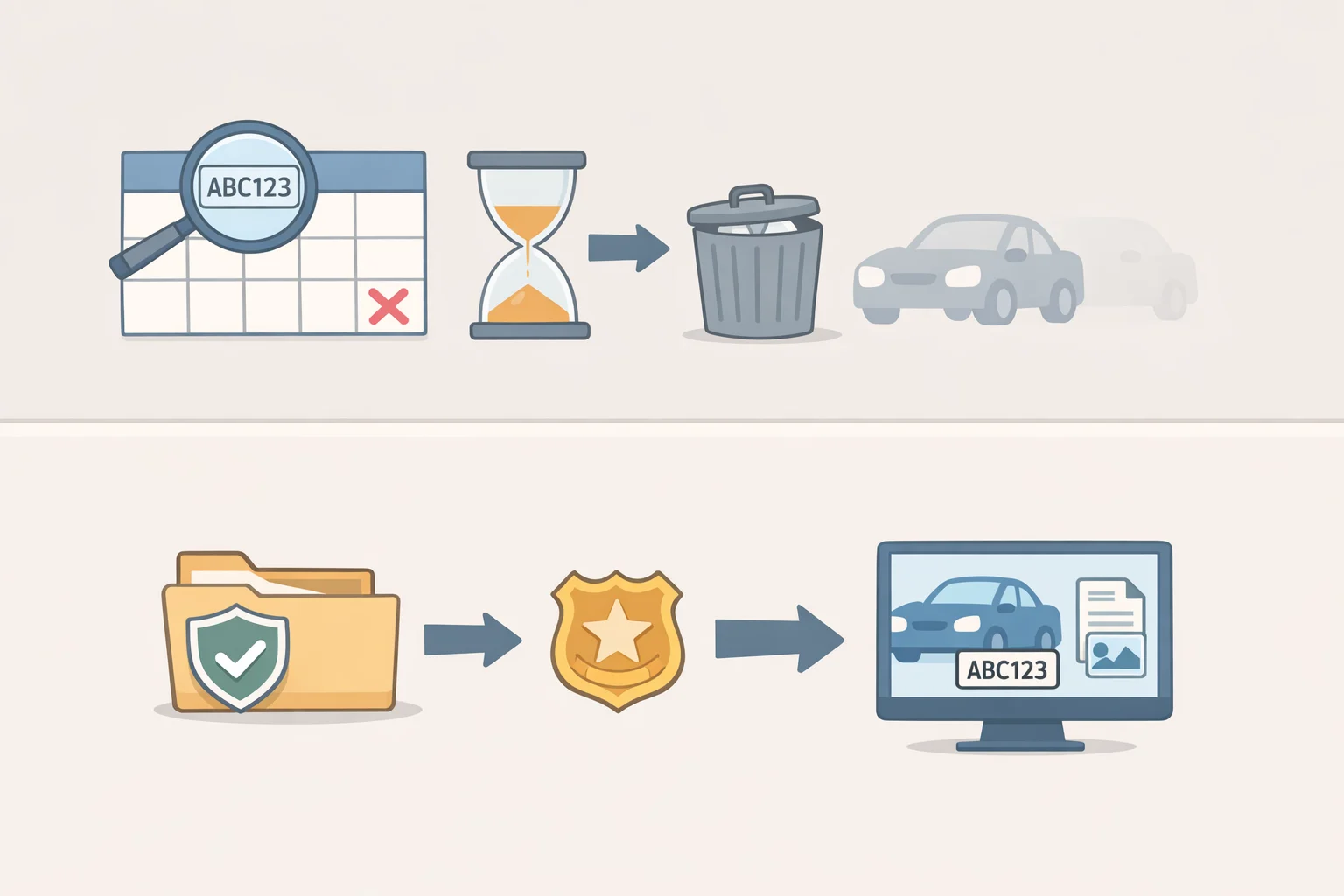
Flock cut its default data-retention window from 30 days to seven, after finding that about 90 percent of searches happen within a week of a camera capture (ACLU, last week). Agencies can still set longer retention to match local or state policy, and a feature called Evidence Mode preserves case-linked searches past that seven-day window once a case number is attached. Whether audit-log rows, the records the lookup tool actually depends on, follow that same seven-day schedule isn't established in the documentation reviewed here. If you're filing a request, ask the agency about audit-log retention specifically rather than assuming it mirrors the camera-data policy.
State law adds another layer of uncertainty for anyone tracking Flock ALPR surveillance through public records. Several states have passed or proposed bills excluding categories of ALPR-related information, typically described as data "collected by" or "gathered by" an ALPR, from public-records law (EFF, earlier this year). Washington's 2026 law is one example; it reportedly overrides a prior court ruling that had let residents see photos police took of their own vehicles, and similar bills were pending in Arizona and Connecticut (EFF, earlier this year). Whether a given state's exemption reaches audit logs specifically, as opposed to raw camera captures, depends on how the statute is written, and that hasn't been settled everywhere. Where it does, a "no result" may reflect a legal wall rather than a clean record.
There's also a category of activity a search log may never capture at all. Agencies can subscribe to FBI-curated hotlist topics inside Flock's system, including one called "Immigration Violator" that's populated exclusively by ICE; a listed vehicle detected by a camera can trigger a local alert (EFF, earlier this summer). Whether that alert, or any law-enforcement contact that follows it, would show up in the same audit trail isn't established in the documentation reviewed here. That limit is a real one, not something either the tool or this article can resolve.
A blank result, then, can mean a few different things: the agency's data was never published, a request was denied or exempted, the tool simply doesn't cover that jurisdiction, or no matching row exists in what's been disclosed. Whether logged searches disappear under Flock's seven-day retention default before anyone requests them is a separate, still-open question. The tool can't tell these apart, but knowing the categories at least tells you which one to chase.
What comes next
Several of the questions raised here don't have documented answers yet: whether audit rows survive Flock's seven-day retention default, how far any given lookup tool's coverage actually reaches, and whether hotlist alerts leave any trace in these exports at all. That uncertainty is worth carrying forward, because it means neither a match nor a blank result should be treated as a final answer.
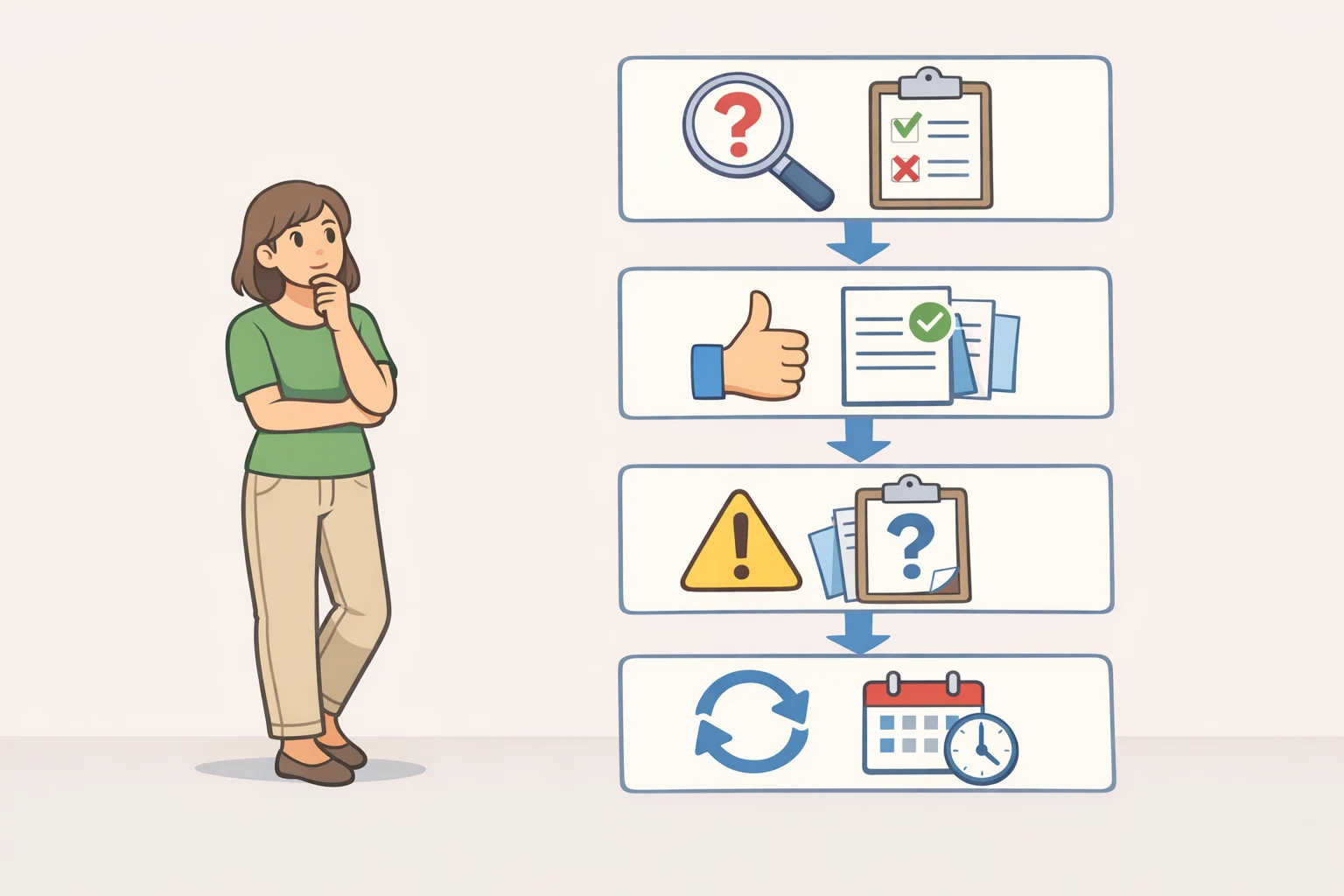
Before drawing conclusions from anything you find, keep this order in mind:
- Check whether the tool already covers your agency.
- If it doesn't, gather your plate, state, likely agencies, and a bounded date range.
- Send the request to the agency that owns the cameras, naming all three exports.
- Read any match against the distinctions above; a manual lookup is not the same as an automated hotlist hit.
- Treat a blank result as inconclusive, not as proof of a clean record.
One case worth watching is Schmidt v. Norfolk, now before the Fourth Circuit, where the ACLU's brief argues that retrospective ALPR searches, the kind that let an agency query weeks or months of a driver's movements after the fact, violate the Fourth Amendment (ACLU, earlier this year). A ruling there wouldn't change what counts as a public record. It could, however, reshape how much retrospective searching agencies get to do in the first place, and with it, how much there is left to disclose.