Password Alternatives for Online Security: Passkeys vs Keys
Picture a fake login page that looks exactly like your bank's, asking for the password you've typed a hundred times. Type it in, and the page forwards you to the real site so nothing looks wrong, while an attacker walks away with the one piece of information guarding the account. That's precisely why password alternatives for online security have stopped being a nice-to-have: NIST's latest digital identity guidelines state plainly that passwords are not phishing-resistant and not replay-resistant, because the identical secret gets typed in every time, including into a page built to steal it (NIST SP 800-63B-4).
NIST isn't writing in the abstract. The standard now orders federal agencies to require phishing-resistant authentication for staff, contractors, and partners, and recommends it for everyone else "whenever practical," explicitly because phishing remains a significant threat (NIST SP 800-63B-4). Separately, a CISA review of recent cloud security incidents, first published last year and updated last month, found attackers repeatedly exploiting software flaws, forging authentication tokens, and reusing stolen credentials to break into organizational systems (CISA).
None of this is a federal compliance briefing for the average reader. It's a guide for anyone managing a personal inbox, a bank login, cloud storage, or a social account, the accounts worth protecting with something sturdier than a memorized string. Federal standards are useful evidence of where authentication is heading, not a bar consumer accounts must clear. The real fix isn't a longer or cleverer password. It's phishing-resistant authentication, delivered today mainly through passkeys and hardware security keys, and passwords aren't disappearing but they shouldn't be the only thing standing between an attacker and an account that matters.
Why passwords fail by design
Video of the Day
A password is, at its core, a reusable secret you've memorized. Eight characters or thirty, the string is identical every time you type it, and that sameness is the flaw, not something symbols and capital letters can engineer around (NIST SP 800-63B-4). NIST's guidelines formally classify passwords as not replay-resistant for exactly this reason: a phishing page or a piece of malware only has to capture the secret once, and it can be reused until the account holder notices and changes it (NIST SP 800-63B-4).
That's not a theoretical risk. That same CISA review found threat actors increasingly relying on stolen credentials, alongside forged tokens and exploited vulnerabilities, to get into organizational infrastructure (CISA). Stolen passwords aren't a relic of the dial-up era. They're an ordinary, active attack path right now.
NIST's response is telling. At its mid-tier assurance standard, the agency now directs verifiers to encourage phishing-resistant authentication "whenever practical," not because passwords occasionally fail, but because phishing itself is one of the biggest threats facing any login system (NIST SP 800-63B-4). The vulnerability is structural, which is why the rest of this piece focuses on replacing or supplementing passwords rather than simply making them longer.
Video of the Day
Passkeys vs. passwords: ranking today's sign-in options
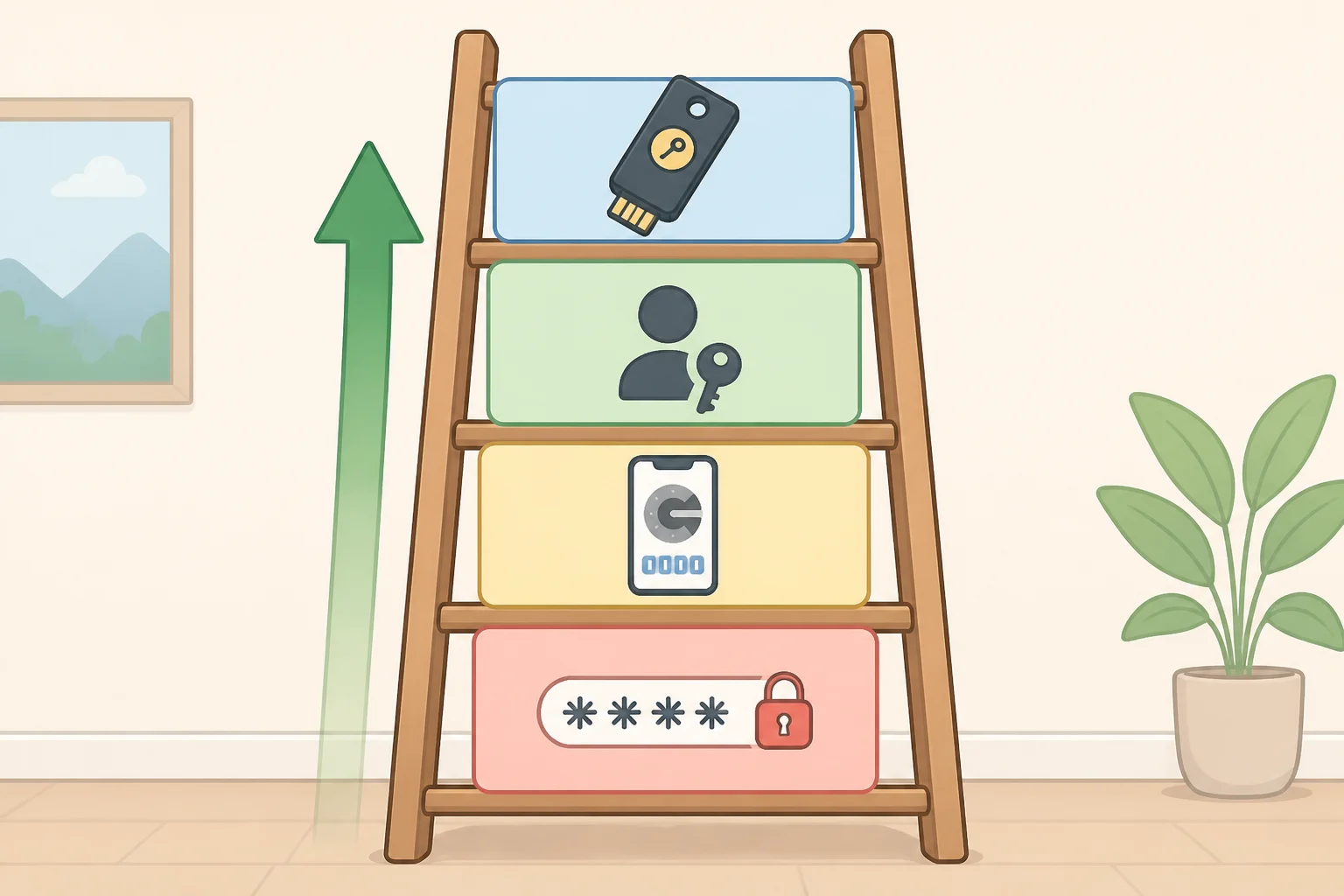
Not every method beyond "just a password" offers the same protection. It helps to think of the options as a ladder running from weakest to strongest, more a practical rule of thumb than a strict research ranking.
A passkey uses a private key controlled by the device or a credential manager, paired with a public key the website stores. NIST describes this arrangement in general terms: the private key lives on the authenticator and is available only to the person who possesses and controls it (NIST SP 800-63-4). Logging in proves control of that key without ever transmitting a secret a phishing page could capture, which makes passkeys one of the more widely available forms of passwordless authentication right now, alongside hardware security keys.
Not all passkeys are built the same way, and the difference matters for recovery as much as security. NIST's highest assurance tier, AAL3, requires a public-key authenticator with a private key that cannot be exported from the device at all, which is what gives that specific category its phishing resistance (NIST SP 800-63-4). That non-exportable design describes device-bound passkeys and dedicated hardware keys specifically; it doesn't describe every consumer passkey. Many passkeys are instead synced across a user's devices through a phone maker's or browser's account system, trading strict device-binding for the convenience of not losing access if a phone breaks. NIST's standard doesn't make a direct claim about how synced passkeys compare on phishing resistance, so that distinction is worth asking a given service about rather than assuming either way.
Hardware security keys, small physical devices built around a dedicated chip, are designed to hold a private key that can't be extracted, matching that stricter description. Whether a specific product and account setup together satisfy the full AAL3 standard depends on more than the device alone, but the category is generally the closest match to NIST's strictest description. For accounts where losing control would be unusually costly, a hardware key is often suggested as a backup credential or even a primary method. Losing the key itself, though, means recovery depends entirely on having a second one ready.
Further down the ladder sit authenticator apps generating one-time codes, and below that, NIST singles out codes delivered over the phone network, meaning text messages and voice calls used for out-of-band authentication, as a "restricted authenticator," the only method called out that way in the current guidelines (NIST SP 800-63B-4). That restricted label isn't a ban. It means NIST's framework attaches extra conditions to that one method, PSTN-based codes, rather than ruling it out. A fingerprint or face scan alone doesn't count as authentication under NIST's rules either, since a biometric isn't a secret; it has to unlock a credential already stored on the device, not stand in for one (NIST SP 800-63-4).
As a practical rule of thumb, then: phone-based codes sit at the bottom, authenticator app codes a step up, passkeys and hardware security keys at the top. NIST's mid-tier standard now requires verifiers to offer at least one phishing-resistant option alongside the easier methods, a sign of where mainstream sign-in is already headed (NIST SP 800-63B-4).
How to use passkeys on your most important accounts
Switching everything to passkeys overnight isn't realistic, and it isn't necessary. A more useful approach to protect online accounts without passwords works through them in order of what an attacker could actually do with each one.
Start with the account that can reset all the others, usually a primary email address. From there, move to banking and financial accounts, cloud storage holding personal files, work logins, and social accounts an attacker could use to impersonate someone. That order isn't a NIST requirement; it's basic risk triage, and starting with the highest-reach account is simply a reasonable place to begin, not an established rule.
For each account, the migration follows roughly the same sequence:
- Check whether the service supports passkeys at all. Many major email, cloud, and financial providers now do, though plenty of smaller sites don't yet.
- If it does, enroll a passkey on the primary device first, whichever phone or laptop gets used most often to sign in.
- Immediately add a second passkey or a hardware security key as a backup credential, tied to a different device. A single enrolled passkey with no backup is one broken phone away from a lockout.
- Check the account's recovery settings. Confirm the email address and phone number on file are current and are themselves protected by strong sign-in, since a weak recovery path can quietly undo the benefit of a strong primary one.
- Store any one-time recovery codes the service provides somewhere offline, not in an unencrypted note on the same phone holding the passkey.
- Sign out of old sessions and review the account's active-devices list before considering the migration finished, so an old, password-based session doesn't linger alongside the new credential.
- Test account recovery once, if the service allows it, before removing the password entirely. Confirming recovery works beats discovering it doesn't during an actual emergency.
One distinction worth keeping straight: a passkey used as the primary sign-in method replaces the password outright, while a passkey or authenticator app added as a second factor to an existing password is multi-factor authentication layered on top of one. Both are improvements. The first removes the phishable secret entirely; the second still has a password sitting underneath, so it's worth working toward full passkey replacement where a service supports it, rather than stopping at MFA.
Multi-factor authentication security when passkeys aren't an option
Plenty of sites still don't support passkeys, and for those, the fallback hierarchy matters. A unique password generated and stored by a password manager, paired with an authenticator app or security key as the second factor, is the strongest combination available when passkeys aren't on the table. Treat text-message codes as a last resort, used only when nothing stronger is offered.
Where a password is the only option, NIST's current rules call for a minimum of 15 characters for single-factor use, dropping to 8 characters if the password is paired with multi-factor authentication, on the logic that length matters more than forced complexity (NIST SP 800-63B-4). These are thresholds NIST sets for the federal systems its guidelines cover, not a rule every consumer site follows, though plenty have adopted something similar. The same guidelines also tell services to drop forced symbol-and-number mixes and scheduled password changes (NIST SP 800-63B-4).
Some of the real work happens on the service's end, not the user's. NIST requires verifiers to screen new passwords against blocklists of known compromised or commonly used passwords and to rate-limit login attempts, server-side controls a password manager can't replicate on its own (NIST SP 800-63B-4). A manager's actual job is simpler: generate and store a unique password for every site, so one breach doesn't cascade into the next.
What strong sign-in doesn't protect: sessions and account recovery
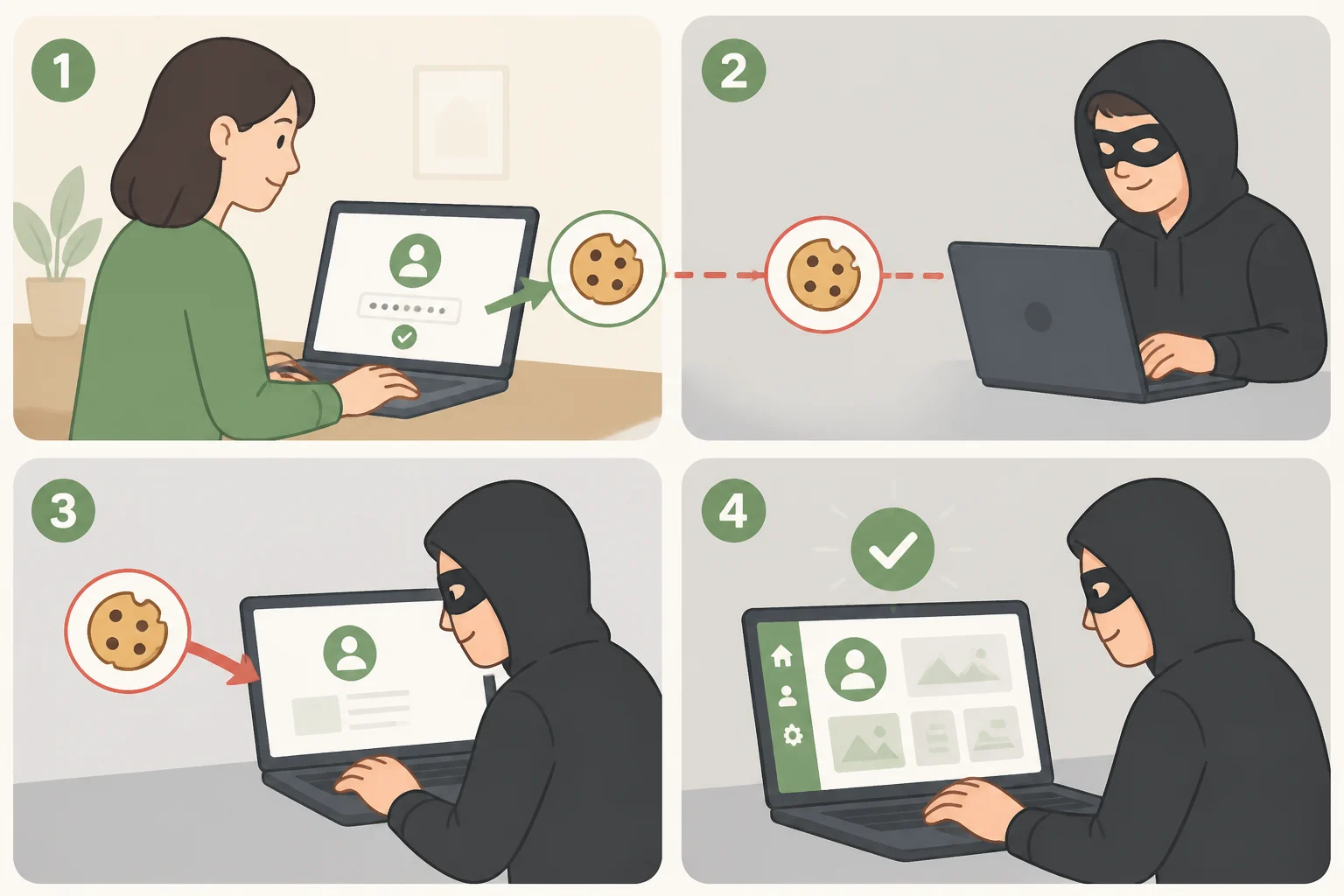
Phishing-resistant authentication protects the moment of login. It doesn't protect what happens after. Once signed in, a browser typically holds onto a small file, often called a session cookie, proving the login already happened, and whoever gets hold of that file can, in principle, reuse it as if already signed in.
CISA's report on cloud identity infrastructure points to a version of the same problem at enterprise scale: when the signing keys behind authentication tokens are compromised, attackers can forge valid tokens, meaning a strong front door doesn't help if the credential behind it is counterfeit (CISA). The scale is different for a personal account than for cloud infrastructure, but the underlying idea, that a session itself becomes the valuable thing once login is done, carries over as a reasonable mental model even without direct data on consumer browsers.
A few habits are sensible responses to that gap, even without a specific study behind each one. Sign out of accounts on shared or public computers instead of just closing the tab. Check the "active sessions" or "connected devices" list in account settings periodically and revoke anything unrecognized. Think twice before installing browser extensions that ask for broad permissions, since that access can include the ability to read stored cookies. None of this replaces phishing-resistant sign-in. It addresses a different stage of the process, the one that starts after the login screen rather than at it.
Where this leaves your accounts
A workable decision framework: use a passkey wherever a service offers one, add a hardware security key as a backup or as the primary method for the handful of accounts where compromise would be unusually costly, fall back to an authenticator app for second-factor duty when passkeys aren't available, and for everything else, a unique password from a manager plus whatever MFA the service supports. That order roughly tracks the strength ladder laid out above, applied account by account rather than all at once.
Start with the account that can reset everything else and work outward. For the technical detail behind the AAL2 and AAL3 standards referenced throughout this piece, NIST's Digital Identity Guidelines lay out the full requirements, and CISA's cloud identity security report covers the enterprise-scale version of the same underlying problem.